TapHome to Modbus RTU / ASCII / TCP#
Supported Communication Layers#
The system accommodates three distinct protocols:
- Modbus RTU via RS485 (accessible through BUS 1, BUS 2, or BUS 3 terminals)
- Modbus ASCII via RS485 (accessible through BUS 1, BUS 2, or BUS 3 terminals)
- Modbus TCP (via ethernet, connecting to local IP address or VPN)
Setup Process#
Configuration involves three primary steps:
Navigate to Settings → Expose devices and select Add Interface. Choose Modbus RTU, Modbus ASCII, or Modbus TCP.
Define communication properties:
- For Modbus RTU or ASCII: Configure Terminal (BUS 1, BUS 2 or BUS 3), Baud rate, Parity, Data bits, Stop bits
- For Modbus TCP: Set TCP Port (IP Address is configured individually per device)
Add devices for exposure:
- Each device displays a brief overview of how third-party systems can access them
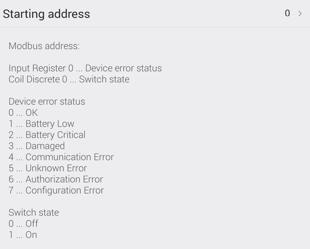
Example: Switch Configuration
Using Modbus TCP for System Integration#
Simply Modbus provides comprehensive protocol documentation. Multiple open-source libraries enable TapHome integration with external systems:
- NModbus4 - C# Modbus protocol implementation GitHub
- libmodbus - Cross-platform library for Linux, Mac OS X, FreeBSD, QNX, Windows GitHub
- pymodbus - Complete Python-based Modbus protocol GitHub
- digitalpetri/modbus - High-performance Java implementation GitHub
- goburrow/modbus - Go language fault-tolerant implementation GitHub
- node-modbus-tcp - NodeJS Modbus TCP/IP
Debugging Modbus RTU Connections#
RS485 physical layer utilization enables parallel monitoring. Consider connecting a “standard USB to RS485 converter” to your PC for communication visibility during integration efforts.
Recommended tools: