LG Air Conditioning via PI-485 and LGAP protocol#
TapHome supports direct communication via RS485 (BUS 1, BUS 2 or BUS 3 terminal) with LG air conditioning condensers and split units. This is done by LG PI-485 communication card and by proprietary LGAP communication protocol.

- Communication via RS485 (Bus) connection.
- Multiple split units can be fully operated from TapHome with minimal additional cost.
- PI-485 will be provided directly by your LG supplier
It is possible to control every split unit separately:
- On/Off
- Operation mode (Cooling, Dehumidification, Fan only, Auto, Heating)
- Thermostat (Set point, Actual temperature)
- Fan speed (Low, Medium, High, Auto)
- Vane swing (On, Off)
Compatibility#
| LG AC product line | PI-485 built in | PI-485 can be added |
|---|---|---|
| Multi V 3 | ✓ | — |
| Multi FDX | ✗ | ✓ |
| Multi MU3 and higher (E.g.: MU3M25) | ✗ | ✓ |
| Split 18 and higher | ✗ | ✓ |
| Multi MU2 (E.g. MU2M15, MU2M16, MU2M17) | ✗ | ✗ |
Requirements#
- LG PI-485 extension card (models PMNFP14A1, PMNFP14A0)
- 1 available TapHome Bus terminal on TapHome Core control unit
Wiring#
Connect PI-485 card with outdoor condenser unit#
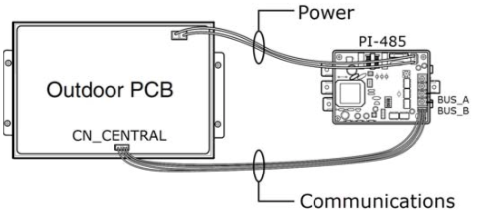
- Disable power to System
- Connect CN_OUT on the PI‐485 to the CN_CENTRAL on the ODU PCB
- Connect BUS_A and BUS_B on the PI‐485 to the LG Central Controller or Gateway
- Select proper DIP Switch configuration: 1 and 4 ON, all others OFF
- Connect CN_PWR on the PI‐485 to the Outdoor Unit PCB Power Connector
- Restore Power to the System
Make sure that PI-485 card is working properly#

Red LED#
- LED blinks as many as the number of Connected Indoor units, and then turns OFF.
- This process is repeated after every 3 minutes
Orange and Yellow LED#
- LED blinks continuously
Green RS485 LED#
- LED blinks when PI-485 receives data from central controller.
For more details, see LG PI-485 Installation Manual: LG-PI485-Manual.pdf
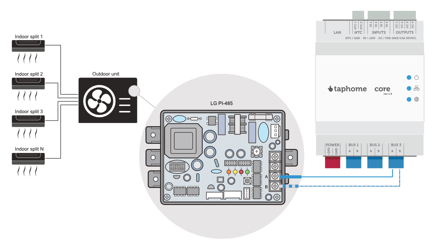
Connect PI-485 with TapHome#
One or more PI-485 cards can be connected to TapHome BUS terminal. This communication line cannot be combined with TapHome Bus devices, or Modbus RTU devices.
Configuration#
Assigning addresses to LG split units#
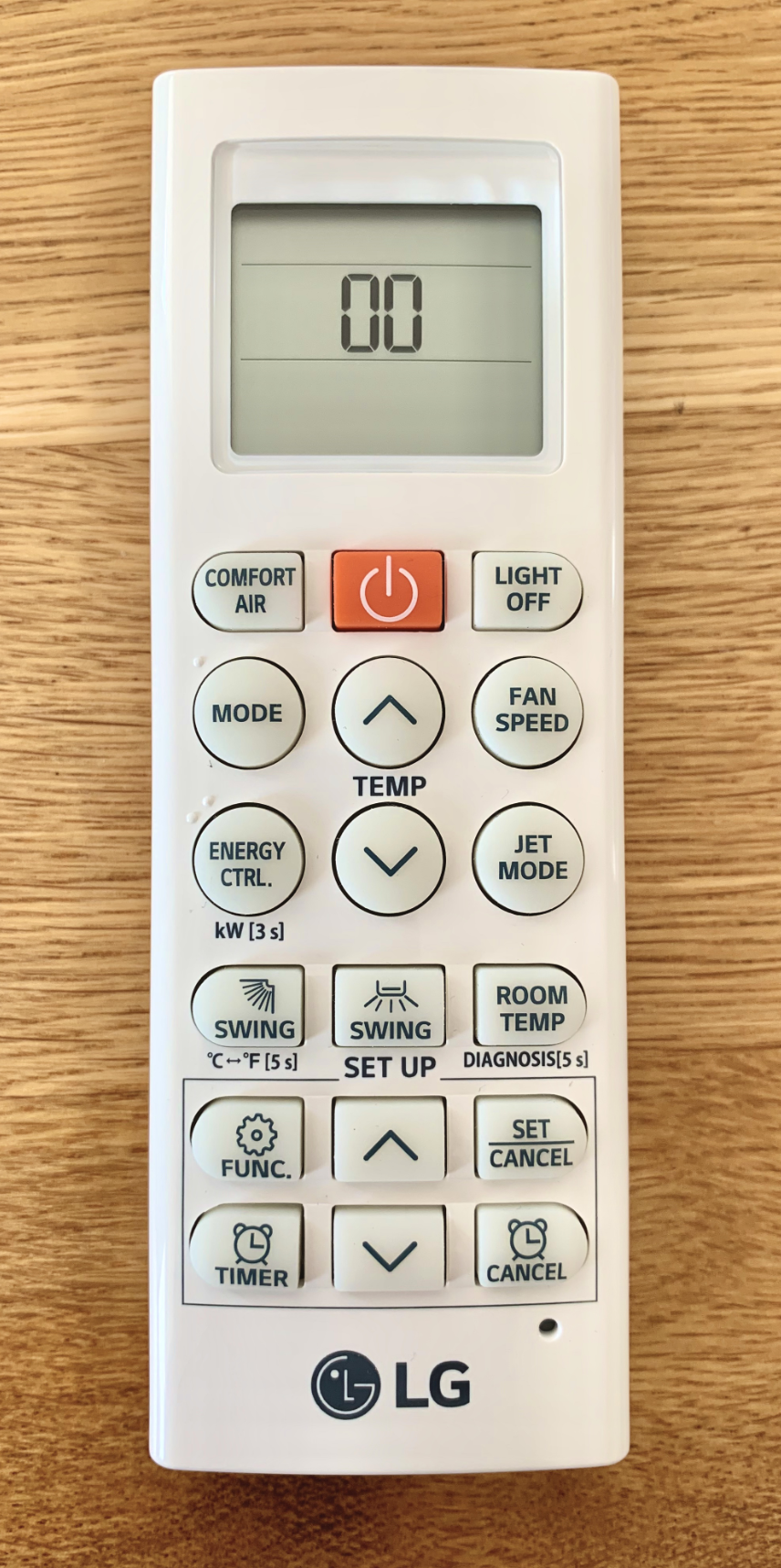
Turn on indoor split unit. To set its unique identification address, you will need to use combination of buttons on infrared remote controller.
Remove battery on infrared remote control. At the same time, hold “FAN SPEED” button and insert the battery back. Once you enter address configuration mode, you can see 2 digits on the display and you can change address by pressing TEMPERATURE UP / DOWN buttons. Confirm your choice with “POWER” button.
Please note that LG unit address on remote control is hexadecimal number, while in TapHome configuration, it is decimal number. E.g. number 0A set in LG is translated as number 10 in TapHome, and number 10 in LG is translated as 16 in TapHome.
Defining LG interface in TapHome#
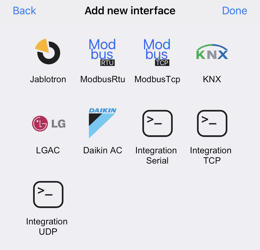
Open Settings → Hardware → TapHome Bus → Terminals and disable one BUS terminal so that you can use it for communication with LG.
In Settings → Hardware → Add new interface → LGAC
Add split units with proper address.